---
title: "Multi-Model Support"
description: "Access hundreds of AI models through a pluggable gateway abstraction"
---
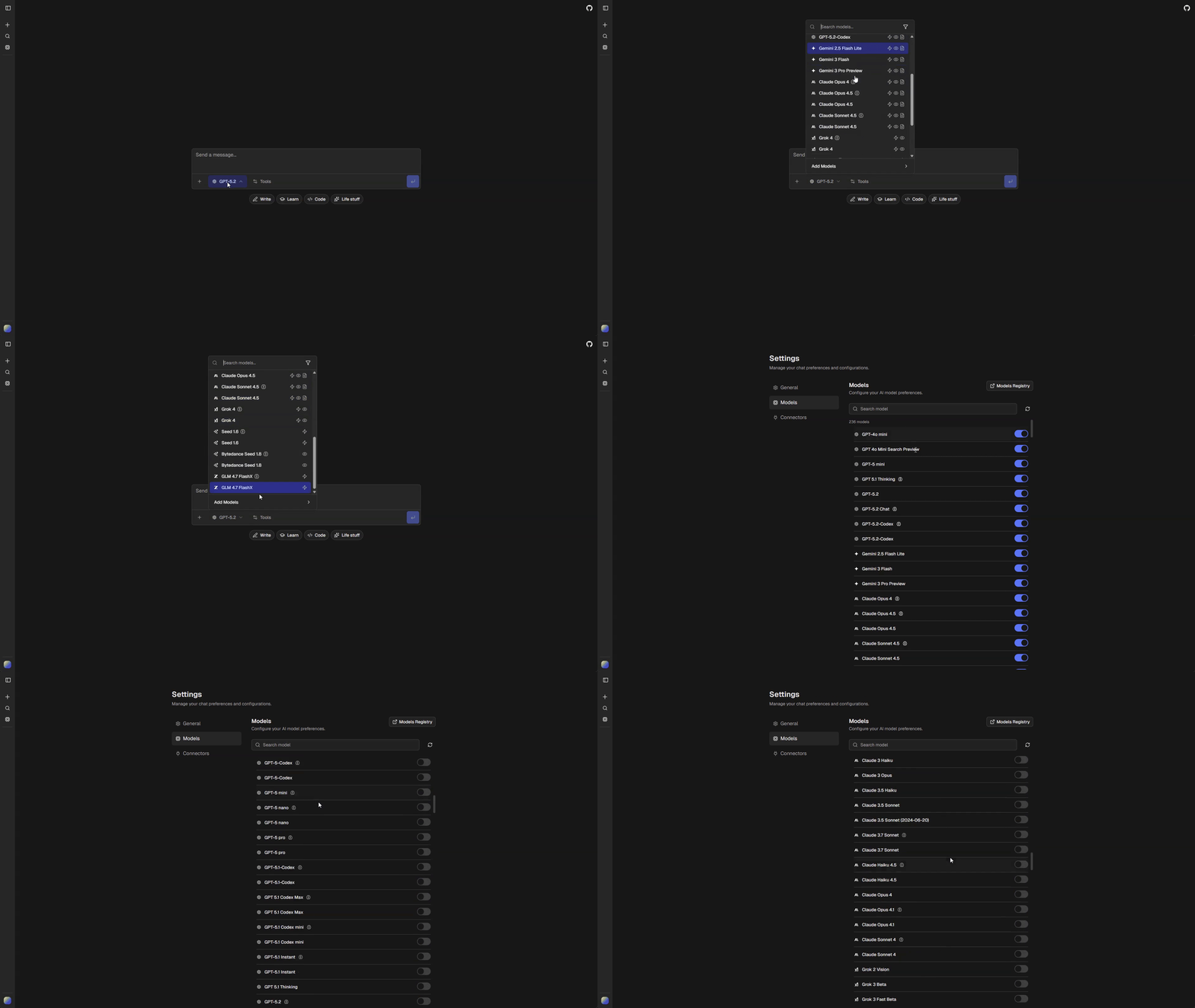
ChatJS provides access to hundreds of models from multiple providers through a pluggable [gateway system](/gateways/overview). Set `ai.gateway` in `chat.config.ts` to choose your backend, then configure which models are available and how they behave.
 See [Gateways](/gateways/overview) for setup instructions and the full gateway comparison.
## Model Configuration
All model settings live in `chat.config.ts` under the `ai` key:
```typescript title="chat.config.ts"
ai: {
gateway: "vercel",
providerOrder: ["openai", "google", "anthropic", "xai"],
disabledModels: ["morph/morph-v3-large", "morph/morph-v3-fast"],
curatedDefaults: [
"openai/gpt-5-nano",
"openai/gpt-5-mini",
"google/gemini-2.5-flash-lite",
"anthropic/claude-sonnet-4.5",
// ...
],
anonymousModels: [
"google/gemini-2.5-flash-lite",
"openai/gpt-5-mini",
// ...
],
workflows: {
chat: "openai/gpt-5-nano",
title: "google/gemini-2.5-flash-lite",
pdf: "openai/gpt-5-mini",
chatImageCompatible: "openai/gpt-4o-mini",
},
tools: {
image: {
enabled: true,
default: "google/gemini-3-pro-image",
},
},
},
```
| Setting | Description |
| -------------------------- | ------------------------------------------------ |
| `ai.gateway` | Active AI gateway |
| `ai.providerOrder` | Provider sort order in the model selector |
| `ai.disabledModels` | Models hidden from all users |
| `ai.curatedDefaults` | Models enabled by default for new users |
| `ai.anonymousModels` | Models available to anonymous users |
| `ai.workflows.*` | Default models for shared application workflows |
| `ai.tools.*` | Tool enablement and tool-specific model defaults |
> **Note**
>
> Image generation uses `ai.tools.image.default`. Language models with the `image-generation` tag can also generate images inline. See [Image Generation](/features/image-generation) for details.
## Reasoning Variants
Models that support extended thinking are automatically split into two variants:
- `{model-id}` (standard mode)
- `{model-id}-reasoning` (extended thinking enabled)
This happens automatically in `buildAppModels()` for any model with `reasoning: true`.
## Visibility Pipeline
Model visibility is determined through a pipeline:
### Authenticated Users
1. **Remove** disabled models (`ai.disabledModels`)
2. **Apply defaults** (`ai.curatedDefaults` plus any new API models not in `models.generated.ts`)
3. **Apply user overrides** from saved preferences
### Anonymous Users
1. **Remove** disabled models
2. **Filter** to `ai.anonymousModels` only
## User Settings
Users configure their model preferences at `/settings/models`. This page lets users toggle individual models on or off. A link to [AI Registry](https://airegistry.app) provides detailed model information.
See [Gateways](/gateways/overview) for setup instructions and the full gateway comparison.
## Model Configuration
All model settings live in `chat.config.ts` under the `ai` key:
```typescript title="chat.config.ts"
ai: {
gateway: "vercel",
providerOrder: ["openai", "google", "anthropic", "xai"],
disabledModels: ["morph/morph-v3-large", "morph/morph-v3-fast"],
curatedDefaults: [
"openai/gpt-5-nano",
"openai/gpt-5-mini",
"google/gemini-2.5-flash-lite",
"anthropic/claude-sonnet-4.5",
// ...
],
anonymousModels: [
"google/gemini-2.5-flash-lite",
"openai/gpt-5-mini",
// ...
],
workflows: {
chat: "openai/gpt-5-nano",
title: "google/gemini-2.5-flash-lite",
pdf: "openai/gpt-5-mini",
chatImageCompatible: "openai/gpt-4o-mini",
},
tools: {
image: {
enabled: true,
default: "google/gemini-3-pro-image",
},
},
},
```
| Setting | Description |
| -------------------------- | ------------------------------------------------ |
| `ai.gateway` | Active AI gateway |
| `ai.providerOrder` | Provider sort order in the model selector |
| `ai.disabledModels` | Models hidden from all users |
| `ai.curatedDefaults` | Models enabled by default for new users |
| `ai.anonymousModels` | Models available to anonymous users |
| `ai.workflows.*` | Default models for shared application workflows |
| `ai.tools.*` | Tool enablement and tool-specific model defaults |
> **Note**
>
> Image generation uses `ai.tools.image.default`. Language models with the `image-generation` tag can also generate images inline. See [Image Generation](/features/image-generation) for details.
## Reasoning Variants
Models that support extended thinking are automatically split into two variants:
- `{model-id}` (standard mode)
- `{model-id}-reasoning` (extended thinking enabled)
This happens automatically in `buildAppModels()` for any model with `reasoning: true`.
## Visibility Pipeline
Model visibility is determined through a pipeline:
### Authenticated Users
1. **Remove** disabled models (`ai.disabledModels`)
2. **Apply defaults** (`ai.curatedDefaults` plus any new API models not in `models.generated.ts`)
3. **Apply user overrides** from saved preferences
### Anonymous Users
1. **Remove** disabled models
2. **Filter** to `ai.anonymousModels` only
## User Settings
Users configure their model preferences at `/settings/models`. This page lets users toggle individual models on or off. A link to [AI Registry](https://airegistry.app) provides detailed model information.