> ## Documentation Index
> Fetch the complete documentation index at: https://chatjs.dev/docs/llms.txt
> Use this file to discover all available pages before exploring further.
# Models
> Add, remove, or configure AI models
## Overview
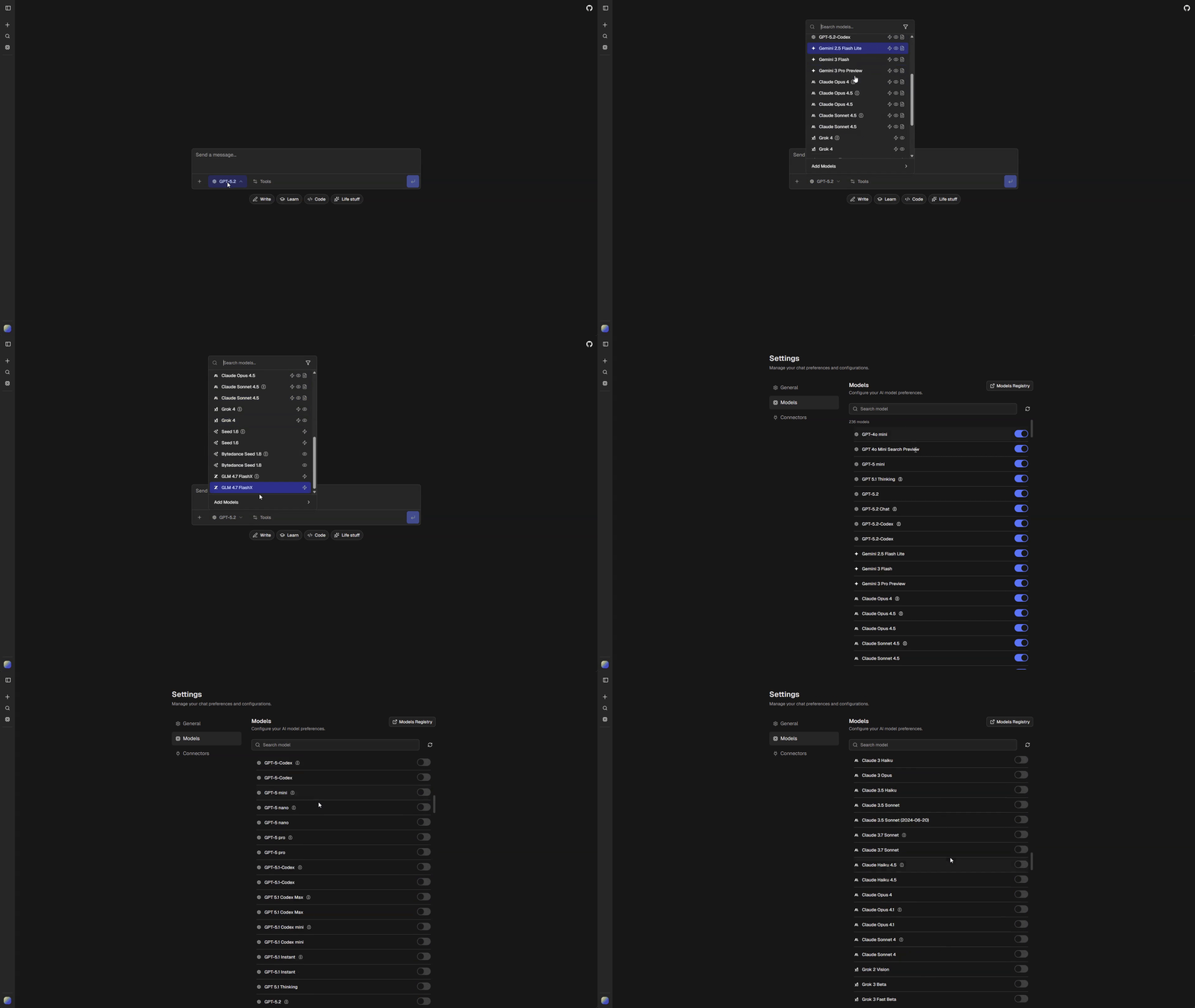
Configure which AI models are available in your app and how they behave. All model configuration lives in `chat.config.ts` under `config.ai`.
 ## Configuration Options
```ts theme={null}
ai: {
gateway: "vercel"; // "vercel" | "openrouter" | "openai" | "openai-compatible"
providerOrder: string[]; // Provider sort order in model selector
disabledModels: AppModelId[]; // Models hidden from all users
curatedDefaults: AppModelId[]; // Default models enabled for new users
anonymousModels: AppModelId[]; // Models available to anonymous users
workflows: { // Default model for shared app workflows
chat: AppModelId;
title: AppModelId;
pdf: AppModelId;
chatImageCompatible: AppModelId;
};
tools: { // Per-tool model and enablement config
followupSuggestions: { enabled: boolean; default: AppModelId };
text: { polish: AppModelId };
sheet: { format: AppModelId; analyze: AppModelId };
code: { edits: AppModelId };
image: { enabled: boolean; default?: ImageModelId };
video: { enabled: boolean; default?: VideoModelId };
deepResearch: {
enabled: boolean;
defaultModel: AppModelId;
finalReportModel: AppModelId;
};
// ... plus webSearch, urlRetrieval, codeExecution, mcp (no model field)
};
}
```
## Provider Order
Control the display order of providers in the model selector:
```ts theme={null}
ai: {
providerOrder: ["openai", "google", "anthropic", "xai"],
}
```
Providers not in this list appear after those listed.
## Disabling Models
Hide specific models from all users:
```ts theme={null}
ai: {
disabledModels: ["morph/morph-v3-large", "morph/morph-v3-fast"],
}
```
## Curated Defaults
Models enabled by default for new users. Users can enable additional models in settings.
```ts theme={null}
ai: {
curatedDefaults: [
"openai/gpt-5-nano",
"openai/gpt-5-mini",
"google/gemini-2.5-flash-lite",
"anthropic/claude-sonnet-4.5",
],
}
```
## Anonymous Models
Restrict which models anonymous (non-authenticated) users can access:
```ts theme={null}
ai: {
anonymousModels: [
"google/gemini-2.5-flash-lite",
"openai/gpt-5-mini",
"openai/gpt-5-nano",
"anthropic/claude-haiku-4.5",
],
}
```
## Workflow Defaults
`ai.workflows` sets the default model for shared app workflows (tasks that don't have a user-facing model picker):
| Field | Description |
| --------------------- | ------------------------------------------------ |
| `chat` | Main conversation model |
| `title` | Generates chat titles |
| `pdf` | PDF document analysis |
| `chatImageCompatible` | Chat fallback model when image input is required |
```ts theme={null}
ai: {
workflows: {
chat: "openai/gpt-5-mini",
title: "openai/gpt-5-nano",
pdf: "openai/gpt-5-mini",
chatImageCompatible: "openai/gpt-4o-mini",
},
}
```
## Tool Model Defaults
`ai.tools` configures the default model for each tool. These are merged with the gateway defaults — only fields you provide override the defaults.
| Tool field | Description |
| ------------------------------- | ----------------------------------------------------------------------------- |
| `followupSuggestions.default` | Generates follow-up questions |
| `text.polish` | Text refinement |
| `sheet.format` | Spreadsheet formatting |
| `sheet.analyze` | Spreadsheet analysis |
| `code.edits` | Code modifications |
| `image.default` | Image generation (see [Image Generation](/features/image-generation)) |
| `video.default` | Video generation (see [Video Generation](/features/video-generation)) |
| `deepResearch.defaultModel` | Research and supervision agent (see [Deep Research](/features/deep-research)) |
| `deepResearch.finalReportModel` | Final report synthesis for deep research |
```ts theme={null}
ai: {
tools: {
followupSuggestions: { enabled: true, default: "google/gemini-2.5-flash-lite" },
text: { polish: "openai/gpt-5-mini" },
sheet: { format: "openai/gpt-5-mini", analyze: "openai/gpt-5-mini" },
code: { edits: "openai/gpt-5-mini" },
image: { enabled: true, default: "google/gemini-3-pro-image" },
video: { enabled: false },
deepResearch: {
enabled: true,
defaultModel: "google/gemini-2.5-flash-lite",
finalReportModel: "google/gemini-3-flash",
},
},
}
```
## AI Providers
Available providers should be listed in `config.services.aiProviders`:
```ts theme={null}
aiProviders: [
"OpenAI", "Anthropic", "xAI", "Google", "Meta",
"Mistral", "Alibaba", "Amazon", "Cohere", "DeepSeek",
"Perplexity", "Vercel", "Inception", "Moonshot", "Morph", "ZAI",
],
```
Model selection and routing is handled through the active [gateway](/gateways/overview).
## Image Models
Set the default image model in `ai.tools.image.default` (gateway-specific model ID). The `generateImage` tool resolves the model at runtime: if the user's selected chat model supports image output (per the app model registry), it uses that; otherwise it uses this default. Resolution uses the dynamic gateway-based registry, not a static snapshot. See [Image Generation](/features/image-generation) for details.
## Configuration Options
```ts theme={null}
ai: {
gateway: "vercel"; // "vercel" | "openrouter" | "openai" | "openai-compatible"
providerOrder: string[]; // Provider sort order in model selector
disabledModels: AppModelId[]; // Models hidden from all users
curatedDefaults: AppModelId[]; // Default models enabled for new users
anonymousModels: AppModelId[]; // Models available to anonymous users
workflows: { // Default model for shared app workflows
chat: AppModelId;
title: AppModelId;
pdf: AppModelId;
chatImageCompatible: AppModelId;
};
tools: { // Per-tool model and enablement config
followupSuggestions: { enabled: boolean; default: AppModelId };
text: { polish: AppModelId };
sheet: { format: AppModelId; analyze: AppModelId };
code: { edits: AppModelId };
image: { enabled: boolean; default?: ImageModelId };
video: { enabled: boolean; default?: VideoModelId };
deepResearch: {
enabled: boolean;
defaultModel: AppModelId;
finalReportModel: AppModelId;
};
// ... plus webSearch, urlRetrieval, codeExecution, mcp (no model field)
};
}
```
## Provider Order
Control the display order of providers in the model selector:
```ts theme={null}
ai: {
providerOrder: ["openai", "google", "anthropic", "xai"],
}
```
Providers not in this list appear after those listed.
## Disabling Models
Hide specific models from all users:
```ts theme={null}
ai: {
disabledModels: ["morph/morph-v3-large", "morph/morph-v3-fast"],
}
```
## Curated Defaults
Models enabled by default for new users. Users can enable additional models in settings.
```ts theme={null}
ai: {
curatedDefaults: [
"openai/gpt-5-nano",
"openai/gpt-5-mini",
"google/gemini-2.5-flash-lite",
"anthropic/claude-sonnet-4.5",
],
}
```
## Anonymous Models
Restrict which models anonymous (non-authenticated) users can access:
```ts theme={null}
ai: {
anonymousModels: [
"google/gemini-2.5-flash-lite",
"openai/gpt-5-mini",
"openai/gpt-5-nano",
"anthropic/claude-haiku-4.5",
],
}
```
## Workflow Defaults
`ai.workflows` sets the default model for shared app workflows (tasks that don't have a user-facing model picker):
| Field | Description |
| --------------------- | ------------------------------------------------ |
| `chat` | Main conversation model |
| `title` | Generates chat titles |
| `pdf` | PDF document analysis |
| `chatImageCompatible` | Chat fallback model when image input is required |
```ts theme={null}
ai: {
workflows: {
chat: "openai/gpt-5-mini",
title: "openai/gpt-5-nano",
pdf: "openai/gpt-5-mini",
chatImageCompatible: "openai/gpt-4o-mini",
},
}
```
## Tool Model Defaults
`ai.tools` configures the default model for each tool. These are merged with the gateway defaults — only fields you provide override the defaults.
| Tool field | Description |
| ------------------------------- | ----------------------------------------------------------------------------- |
| `followupSuggestions.default` | Generates follow-up questions |
| `text.polish` | Text refinement |
| `sheet.format` | Spreadsheet formatting |
| `sheet.analyze` | Spreadsheet analysis |
| `code.edits` | Code modifications |
| `image.default` | Image generation (see [Image Generation](/features/image-generation)) |
| `video.default` | Video generation (see [Video Generation](/features/video-generation)) |
| `deepResearch.defaultModel` | Research and supervision agent (see [Deep Research](/features/deep-research)) |
| `deepResearch.finalReportModel` | Final report synthesis for deep research |
```ts theme={null}
ai: {
tools: {
followupSuggestions: { enabled: true, default: "google/gemini-2.5-flash-lite" },
text: { polish: "openai/gpt-5-mini" },
sheet: { format: "openai/gpt-5-mini", analyze: "openai/gpt-5-mini" },
code: { edits: "openai/gpt-5-mini" },
image: { enabled: true, default: "google/gemini-3-pro-image" },
video: { enabled: false },
deepResearch: {
enabled: true,
defaultModel: "google/gemini-2.5-flash-lite",
finalReportModel: "google/gemini-3-flash",
},
},
}
```
## AI Providers
Available providers should be listed in `config.services.aiProviders`:
```ts theme={null}
aiProviders: [
"OpenAI", "Anthropic", "xAI", "Google", "Meta",
"Mistral", "Alibaba", "Amazon", "Cohere", "DeepSeek",
"Perplexity", "Vercel", "Inception", "Moonshot", "Morph", "ZAI",
],
```
Model selection and routing is handled through the active [gateway](/gateways/overview).
## Image Models
Set the default image model in `ai.tools.image.default` (gateway-specific model ID). The `generateImage` tool resolves the model at runtime: if the user's selected chat model supports image output (per the app model registry), it uses that; otherwise it uses this default. Resolution uses the dynamic gateway-based registry, not a static snapshot. See [Image Generation](/features/image-generation) for details.