---
title: "Attachments"
description: "Upload images and PDFs to conversations"
---
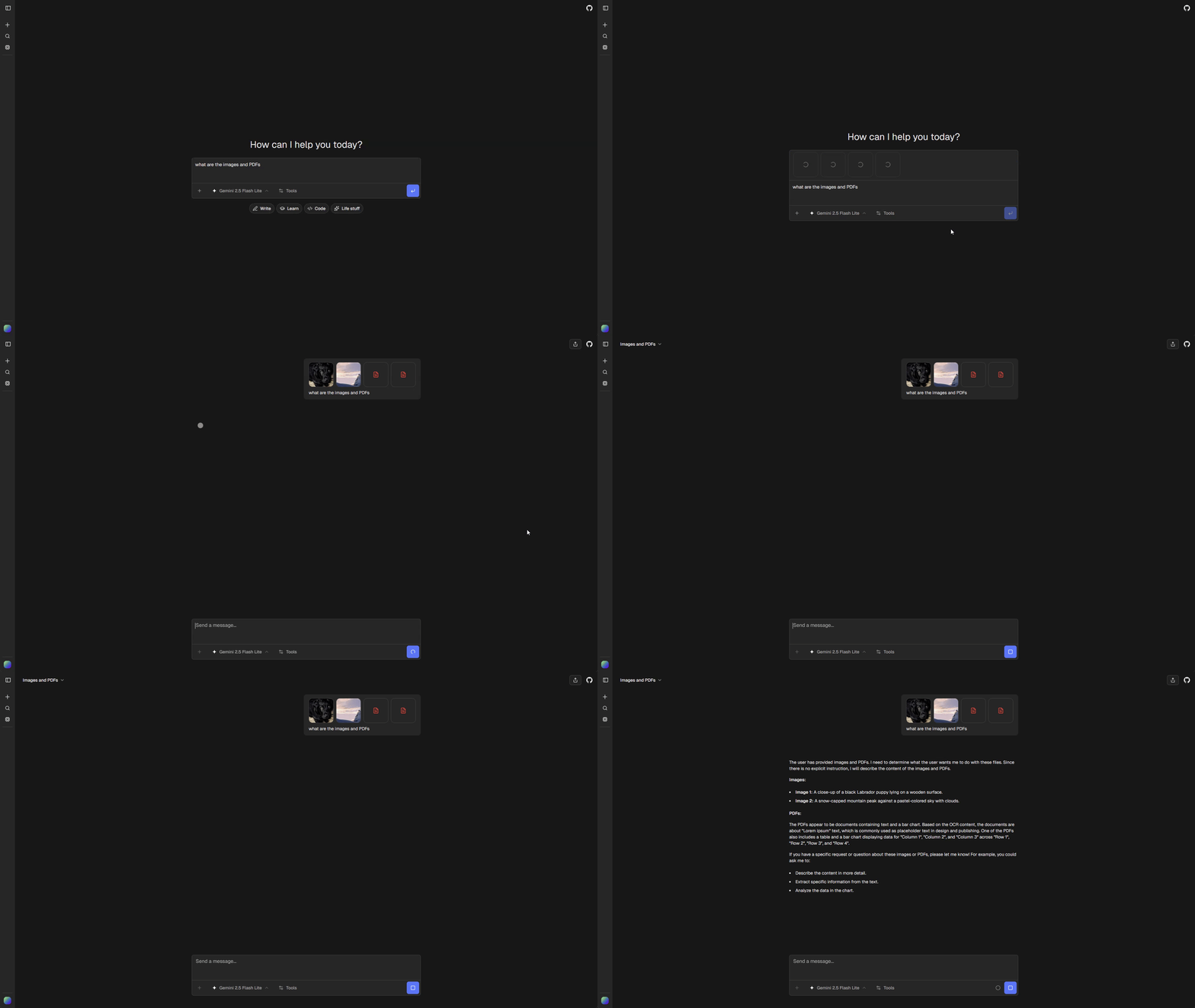
ChatJS supports file attachments in conversations. Files are uploaded through the configured [file storage provider](../storage) and processed by AI models that support multimodal input.
 > **Note**
>
> File attachments require a durable Files SDK provider. If you don't need
> attachments, set `features.attachments: false` in `chat.config.ts`.
## Supported File Types
| Type | Extensions | Processing |
| ------ | ----------------------- | ------------------- |
| Images | `.png`, `.jpg`, `.jpeg` | Direct vision input |
| PDFs | `.pdf` | Text extraction |
## How It Works
1. User attaches file in chat input
2. File uploads through the configured Files SDK provider
3. A provider-agnostic ChatJS URL is included in the message
4. Model processes based on type
## Configuration
### Enable/Disable
Toggle attachments in `chat.config.ts`:
```ts
features: {
attachments: true, // Requires durable file storage
}
```
When disabled:
- Attachment button is hidden from the chat input
- Drag-and-drop and paste file handling are disabled
- File upload API returns 503
### File Storage
Choose a durable provider during installation and configure the environment variables generated for that provider. Vercel Blob uses `BLOB_READ_WRITE_TOKEN`, while other providers have their own credential modes. See [File storage](../storage) for setup and migration guidance.
### Attachment Settings
File attachment settings are configured in `chat.config.ts` under the `attachments` key:
```typescript
attachments: {
maxBytes: 1024 * 1024, // 1MB max after compression
maxDimension: 2048, // Max image width/height
acceptedTypes: {
"image/png": [".png"],
"image/jpeg": [".jpg", ".jpeg"],
"application/pdf": [".pdf"],
},
},
```
## Mobile Behavior
On mobile devices, the attachment button shows a dropdown menu with separate options:
- **Add photos** - Opens the device photo gallery
- **Take photo** - Opens the camera directly
- **Add files** - Opens the file browser for PDFs and documents
This granular selection is intentional: some mobile platforms default to the image picker when the file input accepts both images and other file types, making it difficult for users to select non-image files like PDFs.
## Model Support
Not all models support attachments. Check `model.input` for capability:
```typescript
if (model.input?.image) {
// Model supports image inputs
}
if (model.input?.pdf) {
// Model supports PDF inputs
}
```
When a user attaches a file that the current model doesn't support, ChatJS automatically switches to the compatible model configured in `config.ai.workflows.pdf` or `config.ai.workflows.chatImageCompatible`.
> **Note**
>
> File attachments require a durable Files SDK provider. If you don't need
> attachments, set `features.attachments: false` in `chat.config.ts`.
## Supported File Types
| Type | Extensions | Processing |
| ------ | ----------------------- | ------------------- |
| Images | `.png`, `.jpg`, `.jpeg` | Direct vision input |
| PDFs | `.pdf` | Text extraction |
## How It Works
1. User attaches file in chat input
2. File uploads through the configured Files SDK provider
3. A provider-agnostic ChatJS URL is included in the message
4. Model processes based on type
## Configuration
### Enable/Disable
Toggle attachments in `chat.config.ts`:
```ts
features: {
attachments: true, // Requires durable file storage
}
```
When disabled:
- Attachment button is hidden from the chat input
- Drag-and-drop and paste file handling are disabled
- File upload API returns 503
### File Storage
Choose a durable provider during installation and configure the environment variables generated for that provider. Vercel Blob uses `BLOB_READ_WRITE_TOKEN`, while other providers have their own credential modes. See [File storage](../storage) for setup and migration guidance.
### Attachment Settings
File attachment settings are configured in `chat.config.ts` under the `attachments` key:
```typescript
attachments: {
maxBytes: 1024 * 1024, // 1MB max after compression
maxDimension: 2048, // Max image width/height
acceptedTypes: {
"image/png": [".png"],
"image/jpeg": [".jpg", ".jpeg"],
"application/pdf": [".pdf"],
},
},
```
## Mobile Behavior
On mobile devices, the attachment button shows a dropdown menu with separate options:
- **Add photos** - Opens the device photo gallery
- **Take photo** - Opens the camera directly
- **Add files** - Opens the file browser for PDFs and documents
This granular selection is intentional: some mobile platforms default to the image picker when the file input accepts both images and other file types, making it difficult for users to select non-image files like PDFs.
## Model Support
Not all models support attachments. Check `model.input` for capability:
```typescript
if (model.input?.image) {
// Model supports image inputs
}
if (model.input?.pdf) {
// Model supports PDF inputs
}
```
When a user attaches a file that the current model doesn't support, ChatJS automatically switches to the compatible model configured in `config.ai.workflows.pdf` or `config.ai.workflows.chatImageCompatible`.