---
title: Code Execution
description: Secure Python and JavaScript sandbox for running code
---
## Overview
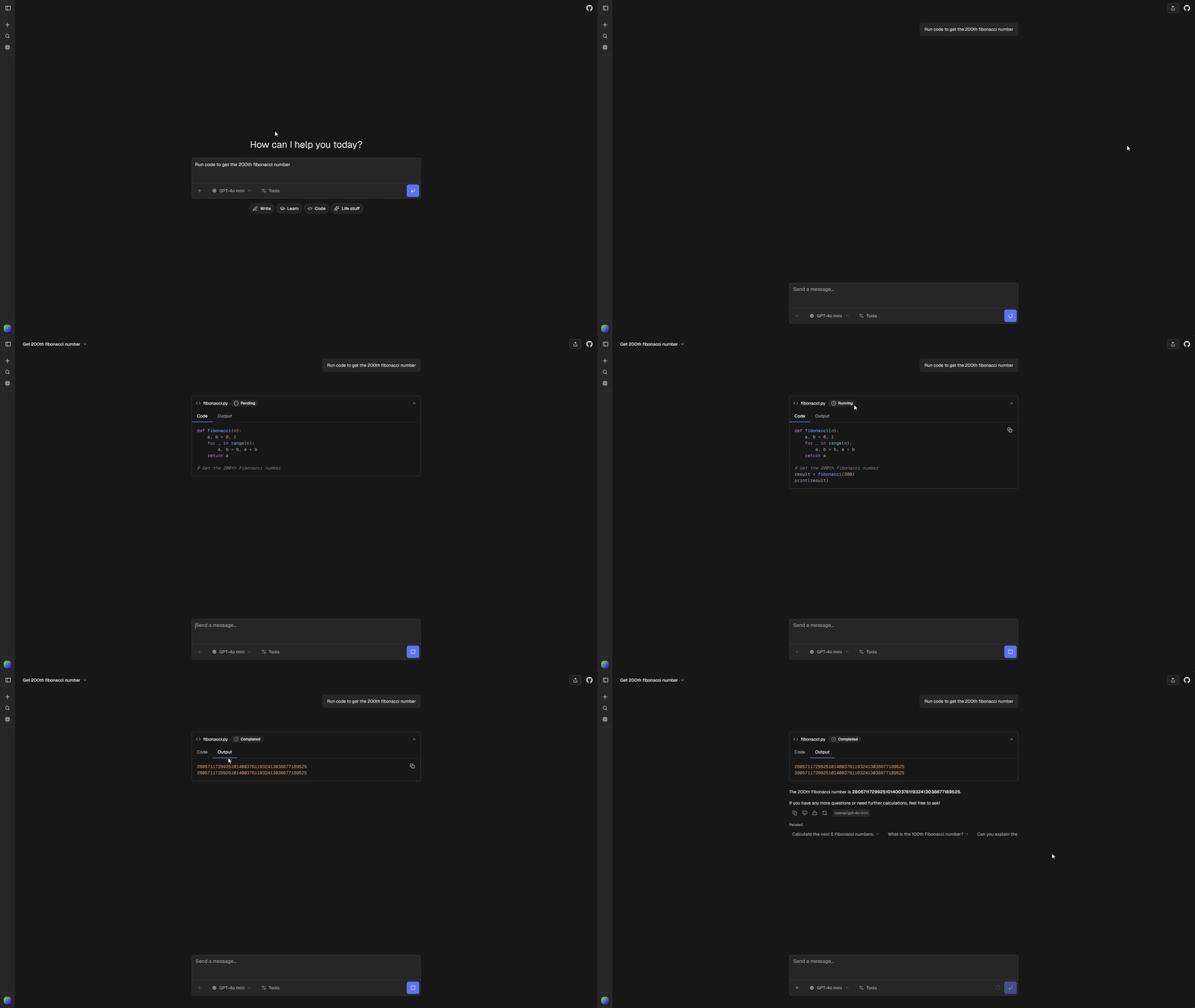
Execute Python and JavaScript code in a secure sandboxed environment directly from chat. The default registry item uses Vercel Sandbox with a 5-minute timeout and 2 vCPUs. You can select an external code-execution item that exports a standard AI SDK tool.
 ## Quick Start
Select the tool when creating an app:
```bash
npx @chat-js/cli@latest create my-app --yes \
--code-execution-tool vercel-code-execution
```
This enables code execution, installs `@vercel/sandbox`, and copies the provider's source to `tools/chatjs/vercel-code-execution/`. An external item URL is also accepted:
```bash
npx @chat-js/cli@latest create my-app --yes \
--code-execution-tool https://example.com/r/my-sandbox.json
```
The fresh template includes only the selected implementation and dependencies. The CLI prints the selected item's credential requirements. Vercel Sandbox needs `VERCEL_OIDC_TOKEN` or the team/project/token credentials described below.
For an existing app, install the item with `chat-js add vercel-code-execution`, then enable it in `chat.config.ts`. When switching implementations, remove the previous provider directory first; only one `codeExecution` item can occupy the slot. Keep generated registration files intact and let `add` or `sync` regenerate them.
```bash
npx @chat-js/cli@latest add vercel-code-execution
```
Enable code execution:
```ts
ai: {
tools: {
codeExecution: {
enabled: true,
},
},
}
```
## Pre-installed Packages
The Vercel item makes these Python packages available out of the box:
- `matplotlib` - Plotting and visualization
- `pandas` - Data analysis
- `numpy` - Numerical computing
- `sympy` - Symbolic mathematics
- `yfinance` - Yahoo Finance market data
## Installing Additional Packages
Add `!pip install` lines at the top of your code. They are automatically stripped before execution:
```python
!pip install requests beautifulsoup4
import requests
from bs4 import BeautifulSoup
response = requests.get("https://example.com")
print(response.status_code)
```
## Output
There are two ways to return output:
**1. Use `print()`**
```python
import pandas as pd
df = pd.DataFrame({"a": [1, 2], "b": [3, 4]})
print(df.head())
```
**2. Assign to `result` or `results`**
The sandbox automatically prints these variables if they exist:
```python
import numpy as np
result = np.mean([1, 2, 3, 4, 5])
```
> **Warning**
>
> Implicit REPL output (last expression value) is not captured. Always use
> `print()` or assign to `result`.
## Charts
The sandbox supports `matplotlib` charts. No need to call `plt.show()`. The chart is saved automatically:
```python
import matplotlib.pyplot as plt
import numpy as np
x = np.linspace(0, 10, 100)
y = np.sin(x)
plt.figure(figsize=(10, 6))
plt.plot(x, y)
plt.title("Sine Wave")
plt.xlabel("x")
plt.ylabel("sin(x)")
```
Supported chart types:
- Line charts
- Scatter plots
- Bar charts
> **Note**
>
> Matplotlib charts are returned as PNG images. Assign a `chart` dictionary for
> interactive line, scatter, and bar charts.
## Customization
### Sandbox Runtime
Set the Python version via environment variable:
```bash
VERCEL_SANDBOX_RUNTIME=python3.13
```
### Non-Vercel Deployments
When deploying outside Vercel (Docker, Railway, Fly.io, etc.), you need to authenticate with an access token since `VERCEL_OIDC_TOKEN` is unavailable.
1. Copy your **Team ID** from team settings
2. Copy your **Project ID** from project settings
3. Create a token in your [Vercel account settings](https://vercel.com/account/tokens) scoped to your team
4. Set these environment variables:
```bash
VERCEL_TEAM_ID=team_xxx
VERCEL_PROJECT_ID=prj_xxx
VERCEL_TOKEN=your_token_here
```
The sandbox automatically uses these credentials when running outside Vercel infrastructure.
### Tool Definition
The installed Vercel implementation lives in `tools/chatjs/vercel-code-execution/`:
The item includes `tool.ts`, `renderer.tsx`, `sandbox.ts`, `python.ts`, `javascript.ts`, `types.ts`, and its `chatjs.json` descriptor. `tools/chatjs/tools.ts` and `tools/chatjs/ui.ts` register the tool and its renderer automatically. `code-execution-config.ts` contains generated credential requirements.
Edit the installed provider source to change its description, runtime, or packages. The app imports the registered tool. Its renderer understands the Vercel item’s `title`, `language`, `code`, `message`, and `chart` fields. External items own their input/output shapes and may provide a different renderer.
Third-party providers use the [standard tool registration](../tools/authoring#selecting-tools-for-app-features). Their credentials and lifecycle belong in their own source. ChatJS does not expose a general-purpose sandbox API or load provider code dynamically.
## Quick Start
Select the tool when creating an app:
```bash
npx @chat-js/cli@latest create my-app --yes \
--code-execution-tool vercel-code-execution
```
This enables code execution, installs `@vercel/sandbox`, and copies the provider's source to `tools/chatjs/vercel-code-execution/`. An external item URL is also accepted:
```bash
npx @chat-js/cli@latest create my-app --yes \
--code-execution-tool https://example.com/r/my-sandbox.json
```
The fresh template includes only the selected implementation and dependencies. The CLI prints the selected item's credential requirements. Vercel Sandbox needs `VERCEL_OIDC_TOKEN` or the team/project/token credentials described below.
For an existing app, install the item with `chat-js add vercel-code-execution`, then enable it in `chat.config.ts`. When switching implementations, remove the previous provider directory first; only one `codeExecution` item can occupy the slot. Keep generated registration files intact and let `add` or `sync` regenerate them.
```bash
npx @chat-js/cli@latest add vercel-code-execution
```
Enable code execution:
```ts
ai: {
tools: {
codeExecution: {
enabled: true,
},
},
}
```
## Pre-installed Packages
The Vercel item makes these Python packages available out of the box:
- `matplotlib` - Plotting and visualization
- `pandas` - Data analysis
- `numpy` - Numerical computing
- `sympy` - Symbolic mathematics
- `yfinance` - Yahoo Finance market data
## Installing Additional Packages
Add `!pip install` lines at the top of your code. They are automatically stripped before execution:
```python
!pip install requests beautifulsoup4
import requests
from bs4 import BeautifulSoup
response = requests.get("https://example.com")
print(response.status_code)
```
## Output
There are two ways to return output:
**1. Use `print()`**
```python
import pandas as pd
df = pd.DataFrame({"a": [1, 2], "b": [3, 4]})
print(df.head())
```
**2. Assign to `result` or `results`**
The sandbox automatically prints these variables if they exist:
```python
import numpy as np
result = np.mean([1, 2, 3, 4, 5])
```
> **Warning**
>
> Implicit REPL output (last expression value) is not captured. Always use
> `print()` or assign to `result`.
## Charts
The sandbox supports `matplotlib` charts. No need to call `plt.show()`. The chart is saved automatically:
```python
import matplotlib.pyplot as plt
import numpy as np
x = np.linspace(0, 10, 100)
y = np.sin(x)
plt.figure(figsize=(10, 6))
plt.plot(x, y)
plt.title("Sine Wave")
plt.xlabel("x")
plt.ylabel("sin(x)")
```
Supported chart types:
- Line charts
- Scatter plots
- Bar charts
> **Note**
>
> Matplotlib charts are returned as PNG images. Assign a `chart` dictionary for
> interactive line, scatter, and bar charts.
## Customization
### Sandbox Runtime
Set the Python version via environment variable:
```bash
VERCEL_SANDBOX_RUNTIME=python3.13
```
### Non-Vercel Deployments
When deploying outside Vercel (Docker, Railway, Fly.io, etc.), you need to authenticate with an access token since `VERCEL_OIDC_TOKEN` is unavailable.
1. Copy your **Team ID** from team settings
2. Copy your **Project ID** from project settings
3. Create a token in your [Vercel account settings](https://vercel.com/account/tokens) scoped to your team
4. Set these environment variables:
```bash
VERCEL_TEAM_ID=team_xxx
VERCEL_PROJECT_ID=prj_xxx
VERCEL_TOKEN=your_token_here
```
The sandbox automatically uses these credentials when running outside Vercel infrastructure.
### Tool Definition
The installed Vercel implementation lives in `tools/chatjs/vercel-code-execution/`:
The item includes `tool.ts`, `renderer.tsx`, `sandbox.ts`, `python.ts`, `javascript.ts`, `types.ts`, and its `chatjs.json` descriptor. `tools/chatjs/tools.ts` and `tools/chatjs/ui.ts` register the tool and its renderer automatically. `code-execution-config.ts` contains generated credential requirements.
Edit the installed provider source to change its description, runtime, or packages. The app imports the registered tool. Its renderer understands the Vercel item’s `title`, `language`, `code`, `message`, and `chart` fields. External items own their input/output shapes and may provide a different renderer.
Third-party providers use the [standard tool registration](../tools/authoring#selecting-tools-for-app-features). Their credentials and lifecycle belong in their own source. ChatJS does not expose a general-purpose sandbox API or load provider code dynamically.