---
title: Image Generation
description: AI-powered image creation in your chat app
---
## Overview
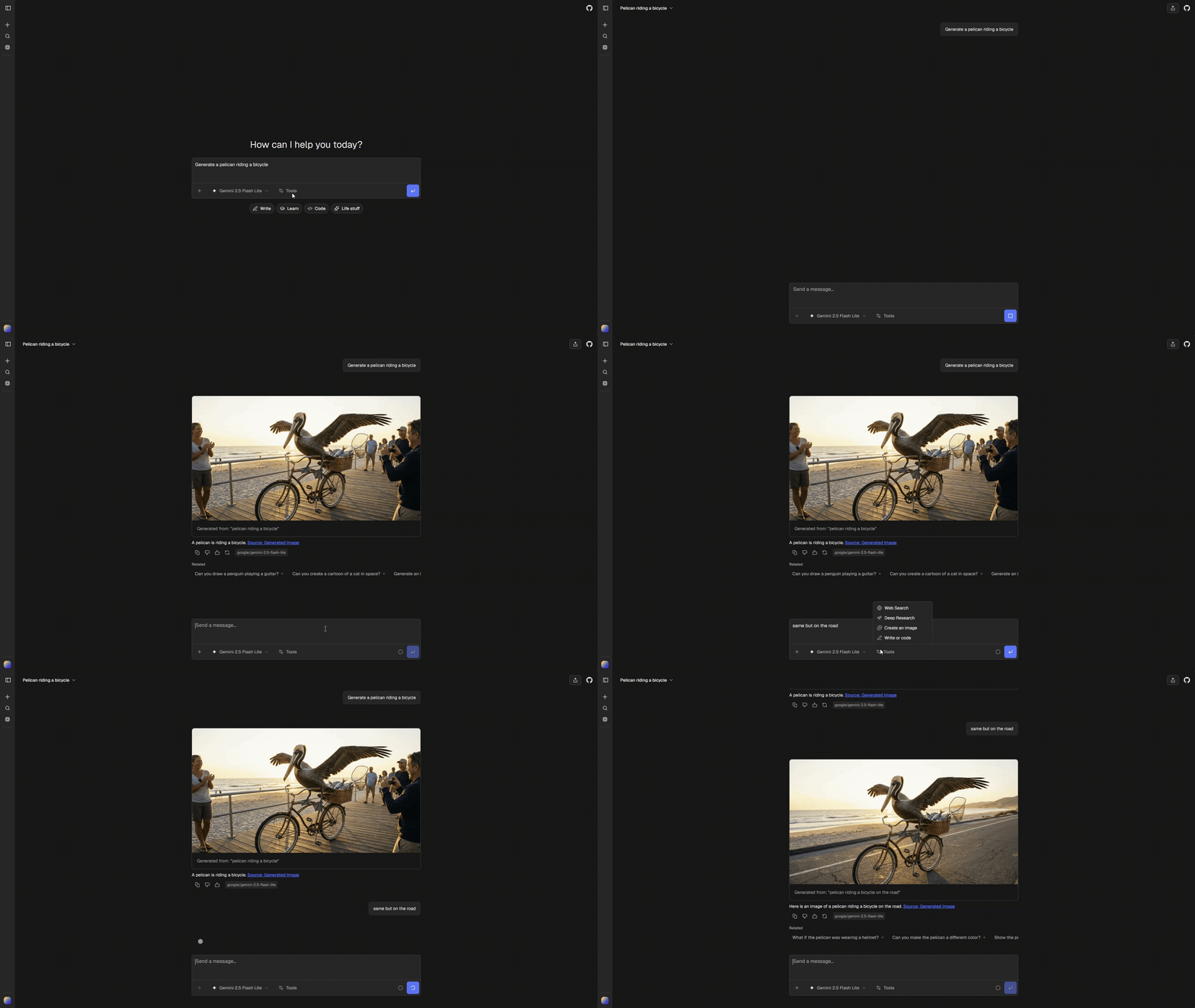
Generate images directly in chat using AI models. Supports both generation from text prompts and iterative editing of existing images.
 ## Quick Start
Install the [image tool](../tools/generate-image), then enable it in `chat.config.ts`:
```ts
ai: {
tools: {
image: {
enabled: true, // Requires durable file storage
},
},
}
```
> **Note**
>
> Image generation requires a durable [file storage provider](../storage) for
> generated images.
Configure the default image model:
```ts
ai: {
tools: {
image: {
default: "google/gemini-3-pro-image",
},
},
}
```
## Modes
The tool operates in two modes based on context:
| Mode | Trigger | Behavior |
| --- | --- | --- |
| `generate` | Text prompt only | Creates new image from scratch |
| `edit` | Prompt + attachments or previous generation | Uses existing images as input |
Mode is determined automatically:
```ts
const mode = imageParts.length > 0 || lastGeneratedImage ? "edit" : "generate";
```
## Iterative Editing
Users can iterate on generated images without re-uploading. The system automatically tracks the last generated image in the conversation.
### How It Works
1. The chat agent scans the latest assistant message for a successful image result.
2. It supplies `lastGeneratedImage`, attachments, the selected model, and the cost accumulator through the AI SDK tool execution context.
3. The installed tool uses those images as input when editing.
The previous-image helper recognizes the built-in `{ imageUrl, prompt }` result. External tools may use different schemas. Unrecognized results are ignored rather than treated as an image.
### User Experience
- User: "Generate a sunset over mountains"
- AI: _generates image_
- User: "Add a lake in the foreground"
- AI: _edits previous image_ (no re-upload needed)
## Image Sources
Edit mode combines images from multiple sources:
| Source | Description |
| -------------------- | ------------------------------------------- |
| `lastGeneratedImage` | Most recent generated image in conversation |
| `attachments` | User-uploaded images in current message |
Both are fetched and passed to the model:
```ts
async function collectEditImages({ imageParts, lastGeneratedImage }) {
return await Promise.all([
...(lastGeneratedImage
? [fetchImageBuffer(lastGeneratedImage.imageUrl)]
: []),
...imageParts.map((p) => fetchImageBuffer(p.url)),
]);
}
```
## Architecture
Follows the [Tool Part](/cookbook/tool-part) pattern:
```text
tools/chatjs/generate-image/tool.ts → tools/chatjs/generate-image/renderer.tsx
```
### Tool Output
```ts
return { imageUrl: result.url, prompt };
```
The generated image is uploaded through the configured Files SDK provider and the ChatJS file URL is returned.
### UI States
| State | Shows |
| ------------------ | --------------------------------------- |
| `input-available` | Skeleton + `Generating image: {prompt}` |
| `output-available` | Image + copy button + prompt |
## Configuration
### Image Model
```ts title="chat.config.ts"
ai: {
tools: {
image: {
default: "google/gemini-3-pro-image",
},
},
}
```
### Model Selection Logic
The tool supports two types of models:
| Type | Description | Example |
| --- | --- | --- |
| Image model | Standalone image generation models | `google/gemini-3-pro-image` |
| Multimodal | Language models with image generation capability | `google/gemini-2.0-flash-exp` |
Model selection is done in `resolveImageModel(selectedModel)` in `tools/chatjs/generate-image/tool.ts`:
1. If the user's selected chat model supports image output (per app model registry, `model.output.image`), use it
2. Otherwise, fall back to `config.ai.tools.image.default`
### Image Model vs Multimodal Generation
The tool uses different generation paths based on model type:
**Image model** (`generateImage` from AI SDK):
- Uses standalone image models via `getImageModel()`
- Supports edit mode with image buffers as input
- Returns base64-encoded images
**Multimodal** (`generateText` with image output):
- Uses language models via `getMultimodalImageModel()`
- Passes images as URL references in message content
- Requires `responseModalities: ["TEXT", "IMAGE"]` for Google models
- Extracts generated image from response files
## Quick Start
Install the [image tool](../tools/generate-image), then enable it in `chat.config.ts`:
```ts
ai: {
tools: {
image: {
enabled: true, // Requires durable file storage
},
},
}
```
> **Note**
>
> Image generation requires a durable [file storage provider](../storage) for
> generated images.
Configure the default image model:
```ts
ai: {
tools: {
image: {
default: "google/gemini-3-pro-image",
},
},
}
```
## Modes
The tool operates in two modes based on context:
| Mode | Trigger | Behavior |
| --- | --- | --- |
| `generate` | Text prompt only | Creates new image from scratch |
| `edit` | Prompt + attachments or previous generation | Uses existing images as input |
Mode is determined automatically:
```ts
const mode = imageParts.length > 0 || lastGeneratedImage ? "edit" : "generate";
```
## Iterative Editing
Users can iterate on generated images without re-uploading. The system automatically tracks the last generated image in the conversation.
### How It Works
1. The chat agent scans the latest assistant message for a successful image result.
2. It supplies `lastGeneratedImage`, attachments, the selected model, and the cost accumulator through the AI SDK tool execution context.
3. The installed tool uses those images as input when editing.
The previous-image helper recognizes the built-in `{ imageUrl, prompt }` result. External tools may use different schemas. Unrecognized results are ignored rather than treated as an image.
### User Experience
- User: "Generate a sunset over mountains"
- AI: _generates image_
- User: "Add a lake in the foreground"
- AI: _edits previous image_ (no re-upload needed)
## Image Sources
Edit mode combines images from multiple sources:
| Source | Description |
| -------------------- | ------------------------------------------- |
| `lastGeneratedImage` | Most recent generated image in conversation |
| `attachments` | User-uploaded images in current message |
Both are fetched and passed to the model:
```ts
async function collectEditImages({ imageParts, lastGeneratedImage }) {
return await Promise.all([
...(lastGeneratedImage
? [fetchImageBuffer(lastGeneratedImage.imageUrl)]
: []),
...imageParts.map((p) => fetchImageBuffer(p.url)),
]);
}
```
## Architecture
Follows the [Tool Part](/cookbook/tool-part) pattern:
```text
tools/chatjs/generate-image/tool.ts → tools/chatjs/generate-image/renderer.tsx
```
### Tool Output
```ts
return { imageUrl: result.url, prompt };
```
The generated image is uploaded through the configured Files SDK provider and the ChatJS file URL is returned.
### UI States
| State | Shows |
| ------------------ | --------------------------------------- |
| `input-available` | Skeleton + `Generating image: {prompt}` |
| `output-available` | Image + copy button + prompt |
## Configuration
### Image Model
```ts title="chat.config.ts"
ai: {
tools: {
image: {
default: "google/gemini-3-pro-image",
},
},
}
```
### Model Selection Logic
The tool supports two types of models:
| Type | Description | Example |
| --- | --- | --- |
| Image model | Standalone image generation models | `google/gemini-3-pro-image` |
| Multimodal | Language models with image generation capability | `google/gemini-2.0-flash-exp` |
Model selection is done in `resolveImageModel(selectedModel)` in `tools/chatjs/generate-image/tool.ts`:
1. If the user's selected chat model supports image output (per app model registry, `model.output.image`), use it
2. Otherwise, fall back to `config.ai.tools.image.default`
### Image Model vs Multimodal Generation
The tool uses different generation paths based on model type:
**Image model** (`generateImage` from AI SDK):
- Uses standalone image models via `getImageModel()`
- Supports edit mode with image buffers as input
- Returns base64-encoded images
**Multimodal** (`generateText` with image output):
- Uses language models via `getMultimodalImageModel()`
- Passes images as URL references in message content
- Requires `responseModalities: ["TEXT", "IMAGE"]` for Google models
- Extracts generated image from response files