---
title: Web Search
description: Real-time web search with citations
---
## Overview
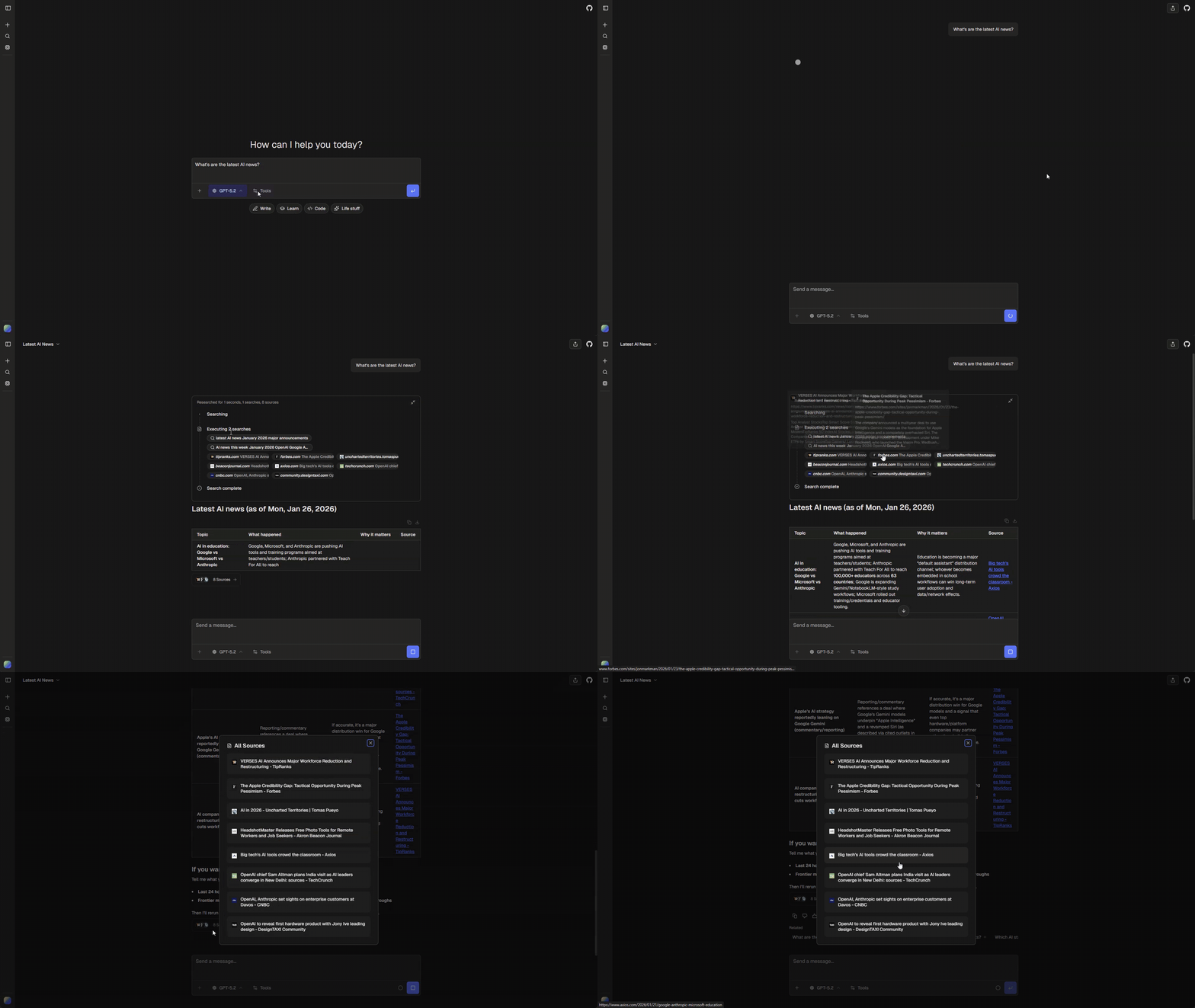
Enable your AI to search the web in real-time and provide answers with inline citations. The tool supports multiple queries per request for comprehensive research.
 ## Quick Start
Enable web search in `chat.config.ts`:
```ts
ai: {
tools: {
webSearch: {
enabled: true, // Requires the selected search tool’s credentials
},
},
}
```
## Environment Variables
Select a search tool when creating the app:
```bash
bunx @chat-js/cli create my-app --search-tool tavily-search
# Or: --search-tool firecrawl-search
```
Set `TAVILY_API_KEY` for Tavily or `FIRECRAWL_API_KEY` for Firecrawl in `.env.local`. The selected tool is used by both chat and deep research. Keys do not select the implementation automatically.
## Providers
| Provider | Best For | Features |
| --- | --- | --- |
| Tavily | General search | Topic filtering, news mode, domain exclusions |
| Firecrawl | Content extraction | High-quality markdown from web pages |
### Tavily
Default provider with search-specific optimizations:
- **Topics**: `general` or `news` (news limits to last 7 days)
- **Search depth**: `basic` or `advanced`
- **Domain filtering**: Exclude specific domains from results
### Firecrawl
Alternative provider focused on content quality. Returns clean markdown extracted from pages.
## Features
### Multi-Query Search
The tool accepts up to 2 queries per request, executed in parallel:
```ts
{
search_queries: [
{ query: "latest AI developments 2024", maxResults: 5 },
{ query: "machine learning trends", maxResults: 5 },
];
}
```
Results are automatically deduplicated by domain and URL.
### Inline Citations
Search results are displayed as collapsible source cards. The AI is instructed to cite sources inline when using retrieved information.
### Progress Indicators
While searching, the UI shows:
- Search status (running/completed)
- Query text being executed
- Number of sources found
### Tool Output
Returns search results grouped by query:
```ts
{
searches: [
{
query: { query: "...", maxResults: 5 },
results: [{ url: "...", title: "...", content: "..." }],
},
];
}
```
### UI States
| State | Shows |
| ------------------ | --------------------------------------------- |
| `input-available` | Progress indicator with query |
| `output-available` | Collapsible source cards with titles and URLs |
## Customization
### Tool Definition
The selected implementation lives in `tools/chatjs//tool.ts`. Edit its typed schema, description, and execution options there. Shared progress and source card events are handled by `tools/platform/search-presentation.ts`.
### Change the selected tool
Keep any custom edits, then remove the previous search tool directory (for example, `tools/chatjs/tavily-search`) and install the replacement:
```bash
bunx @chat-js/cli add firecrawl-search
```
Sync requires exactly one installed search selection when search is used. It generates the registration indexes in `tools/chatjs/tools.ts` and `ui.ts`, plus `search-config.ts` for credentials. Do not edit generated files. An unused native package can be removed after checking that no other tool uses it. Firecrawl may also be needed by URL retrieval.
## URL Retrieval
A separate `retrieveUrl` tool is available for fetching structured content from specific URLs (as opposed to searching the web). This tool uses Firecrawl to extract clean markdown from any webpage.
Enable in `chat.config.ts`:
```ts
ai: {
tools: {
urlRetrieval: {
enabled: true, // Requires FIRECRAWL_API_KEY
},
},
}
```
The tool extracts:
- Page title and description
- Clean markdown content
- Source URL and language metadata
Use web search for discovery and URL retrieval for extracting content from known URLs.
## External search tools
Pass an external registry item URL to `--search-tool`. The item exports a standard AI SDK tool and declares `slot: "webSearch"`. It owns its schema, output, credentials, and optional renderer. The multi-query schema and progress cards above describe the built-in items, not requirements for external search tools.
Chat and deep research both expose the selected tool to their models. See [Authoring tools](../tools/authoring#selecting-tools-for-app-features) for metadata and renderer registration.
## Quick Start
Enable web search in `chat.config.ts`:
```ts
ai: {
tools: {
webSearch: {
enabled: true, // Requires the selected search tool’s credentials
},
},
}
```
## Environment Variables
Select a search tool when creating the app:
```bash
bunx @chat-js/cli create my-app --search-tool tavily-search
# Or: --search-tool firecrawl-search
```
Set `TAVILY_API_KEY` for Tavily or `FIRECRAWL_API_KEY` for Firecrawl in `.env.local`. The selected tool is used by both chat and deep research. Keys do not select the implementation automatically.
## Providers
| Provider | Best For | Features |
| --- | --- | --- |
| Tavily | General search | Topic filtering, news mode, domain exclusions |
| Firecrawl | Content extraction | High-quality markdown from web pages |
### Tavily
Default provider with search-specific optimizations:
- **Topics**: `general` or `news` (news limits to last 7 days)
- **Search depth**: `basic` or `advanced`
- **Domain filtering**: Exclude specific domains from results
### Firecrawl
Alternative provider focused on content quality. Returns clean markdown extracted from pages.
## Features
### Multi-Query Search
The tool accepts up to 2 queries per request, executed in parallel:
```ts
{
search_queries: [
{ query: "latest AI developments 2024", maxResults: 5 },
{ query: "machine learning trends", maxResults: 5 },
];
}
```
Results are automatically deduplicated by domain and URL.
### Inline Citations
Search results are displayed as collapsible source cards. The AI is instructed to cite sources inline when using retrieved information.
### Progress Indicators
While searching, the UI shows:
- Search status (running/completed)
- Query text being executed
- Number of sources found
### Tool Output
Returns search results grouped by query:
```ts
{
searches: [
{
query: { query: "...", maxResults: 5 },
results: [{ url: "...", title: "...", content: "..." }],
},
];
}
```
### UI States
| State | Shows |
| ------------------ | --------------------------------------------- |
| `input-available` | Progress indicator with query |
| `output-available` | Collapsible source cards with titles and URLs |
## Customization
### Tool Definition
The selected implementation lives in `tools/chatjs//tool.ts`. Edit its typed schema, description, and execution options there. Shared progress and source card events are handled by `tools/platform/search-presentation.ts`.
### Change the selected tool
Keep any custom edits, then remove the previous search tool directory (for example, `tools/chatjs/tavily-search`) and install the replacement:
```bash
bunx @chat-js/cli add firecrawl-search
```
Sync requires exactly one installed search selection when search is used. It generates the registration indexes in `tools/chatjs/tools.ts` and `ui.ts`, plus `search-config.ts` for credentials. Do not edit generated files. An unused native package can be removed after checking that no other tool uses it. Firecrawl may also be needed by URL retrieval.
## URL Retrieval
A separate `retrieveUrl` tool is available for fetching structured content from specific URLs (as opposed to searching the web). This tool uses Firecrawl to extract clean markdown from any webpage.
Enable in `chat.config.ts`:
```ts
ai: {
tools: {
urlRetrieval: {
enabled: true, // Requires FIRECRAWL_API_KEY
},
},
}
```
The tool extracts:
- Page title and description
- Clean markdown content
- Source URL and language metadata
Use web search for discovery and URL retrieval for extracting content from known URLs.
## External search tools
Pass an external registry item URL to `--search-tool`. The item exports a standard AI SDK tool and declares `slot: "webSearch"`. It owns its schema, output, credentials, and optional renderer. The multi-query schema and progress cards above describe the built-in items, not requirements for external search tools.
Chat and deep research both expose the selected tool to their models. See [Authoring tools](../tools/authoring#selecting-tools-for-app-features) for metadata and renderer registration.